
memtrace insight-card
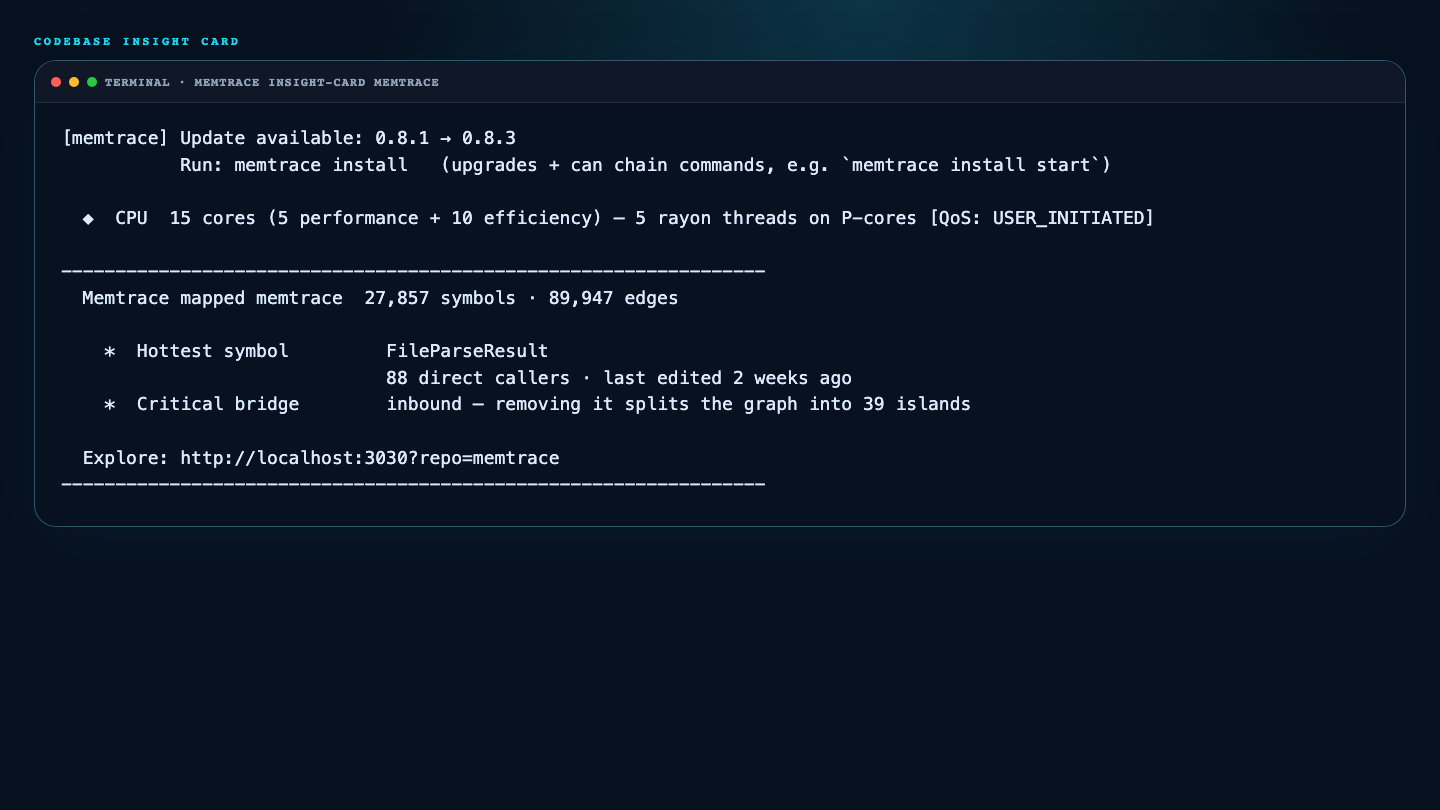
Print the Codebase Insight Card on demand — a compact per-repo summary of the hottest symbol, likely dead code, and the most critical bridge symbol, straight from the knowledge graph.
Usage#
memtrace insight-card [repoId]memtrace insight-card prints the Codebase Insight Card on demand — a compact summary of what Memtrace's graph algorithms found in a repo. With no argument it renders one card per indexed repository; with a repoId it renders just that repo.
You've likely already seen this card once: memtrace start prints it automatically after a repo's first index. This command bypasses the stamp that suppresses that repeat printing, so you can pull the card up again whenever you want it.
Card contents#
Each card assembles up to three facts straight from graph algorithms run against MemDB:
- Hottest symbol — the most-called symbol (via bridge/centrality search), plus its last-edited date from a
git loglookup on its file. - Likely dead code — a zero-caller function/method count. This line is suppressed when the dead ratio is under 5% of live functions and methods, so the card doesn't nag on a healthy repo.
- Critical bridge symbol — the top result from bridge-symbol detection, with up to 3 dependent community names attached for context.
If all three structural slots come back empty, the card falls back to a "Modules detected" line instead (up to 3 community names). If even that's empty, the repo gets no card at all — just a dim "not enough graph data yet" line telling you to run memtrace start to bootstrap it.
Insight cards carry no license or entitlement check — the command works the same on every plan.
Multiple repos and the cap#
With no repoId, cards are sorted by node count descending and capped at 5. Anything past the top 5 collapses into a single "… and N more — run memtrace insight-card <repo_id> to see them" hint line instead of being rendered in full.
Passing an unknown repoId isn't rejected outright — path lookup falls back to the current working directory, and you'll typically just get the "not enough graph data yet" line rather than a hard error.
Environment variables#
| Variable | Default | Description |
|---|---|---|
NO_COLOR | — | Any non-empty value forces plain-ASCII output (dashes, * bullets, no ANSI escapes). Otherwise color and Unicode are used when stderr is a TTY, plain text otherwise. |
MEMTRACE_UI_PORT | 3030 | Port used in the card's footer link, Explore: http://localhost:<port>?repo=<repoId>. The command doesn't start the UI itself — the link just assumes it's running there. |
MEMTRACE_MEMDB_MODE | local | How the command reaches MemDB: embedded | local (sidecar, the default) | external. In local mode a memcore-server sidecar is spawned or adopted if this process ends up as the workspace runtime owner. |
MEMTRACE_MEMDB_ENDPOINT | http://127.0.0.1:50051 | MemDB gRPC endpoint the command connects to. If unreachable, it prints "Cannot reach MemDB at <endpoint>" and still exits 0. |
MEMTRACE_LOG_LEVEL / RUST_LOG | — | The command initializes logging with the Quiet profile by default (only warnings/errors surface); either variable overrides the filter. |
Gotchas#
memtrace insight-card > file captures nothing — cards print via stderr. Redirect stderr instead: memtrace insight-card 2> card.txt.
Unreachable MemDB, zero indexed repos, an unknown repoId, and empty cards all still exit 0. Scripts must parse the stderr text, not the exit code.
The automatic first-index card is suppressed on repeat runs by an insight_card_shown stamp keyed on (repo_id, HEAD_sha) plus a fact fingerprint. This command bypasses that stamp in both directions: it never checks it before rendering, so it always prints — and it never writes it, so running it doesn't suppress the next automatic card either.
A no-argument run considers every indexed repo, then renders the top 5 by node count with an "... and N more" hint when more repos are present. Git metadata is best-effort: non-git directories render the HEAD sha and last-edit fields as "unknown."
Examples#
$ memtrace insight-card
# One card per indexed repo, largest (by symbol count) first,
# capped at 5 with an '... and N more' hint.

$ memtrace insight-card my-repo-id
# Card for a single repo. Get repo ids from the no-arg run.

$ NO_COLOR=1 memtrace insight-card 2> card.txt
# Cards go to stderr; NO_COLOR (or any non-TTY stderr) switches
# to plain ASCII, so this captures a clean text card.
See also memtrace start, memtrace index, and Quality.